How to Manage Inventory Across Multiple Branches for Ecommerce
Managing inventory across multiple branches can be challenging for growing ecommerce businesses. Learn how to track stock by location, manage fulfillment, and keep your online store connected with your branch inventory.
 Apna Kaam Team
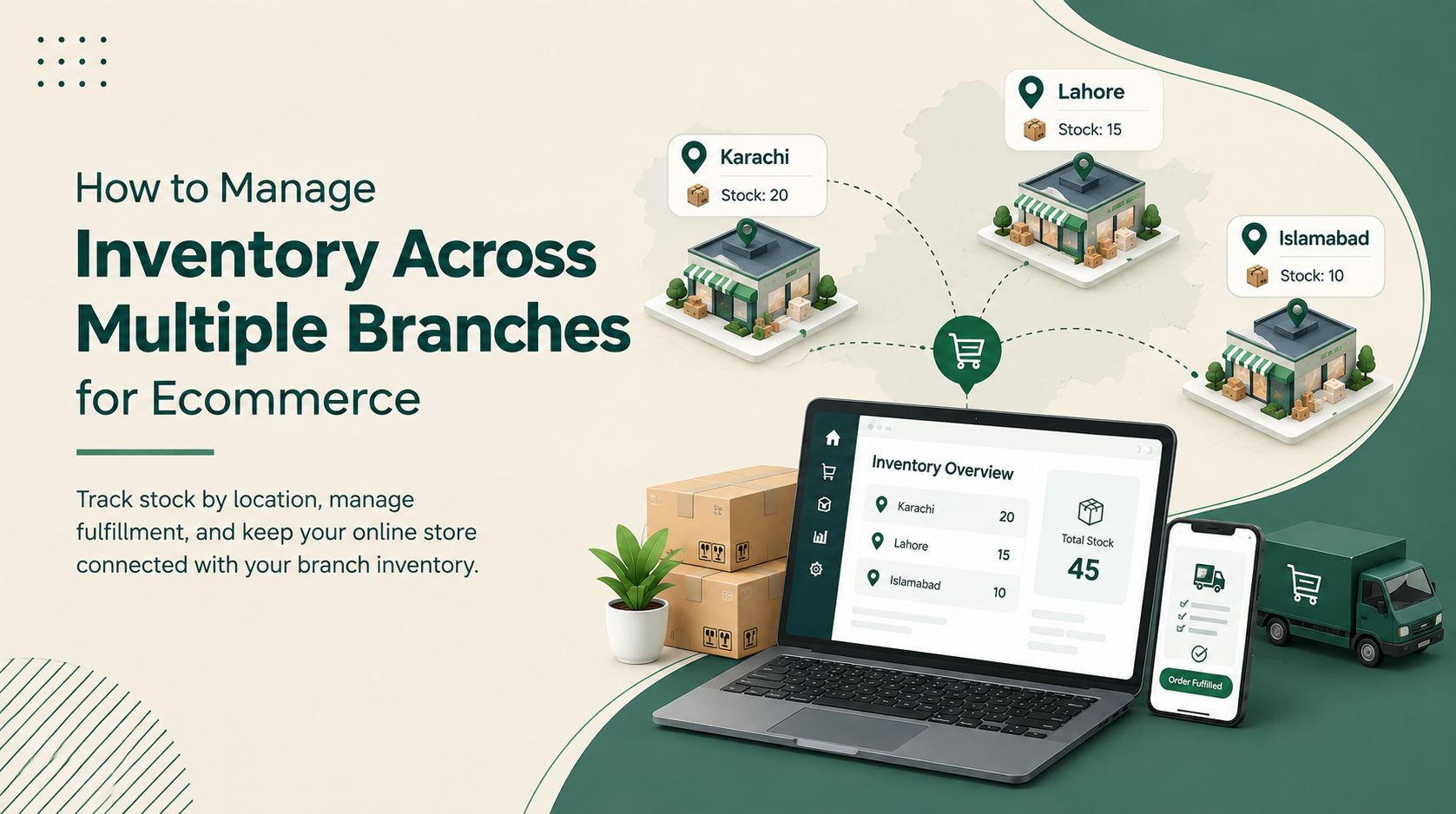
Managing inventory becomes much more challenging when a business operates across multiple branches or cities.
Imagine an ecommerce business with branches in Karachi, Lahore, and Islamabad. A product may be available in Karachi but completely out of stock in Lahore. At the same time, the website may show the combined stock from all three branches.
So the real question is:
If a product is available somewhere, should it automatically be shown as available to every customer?
Not necessarily.
For growing ecommerce businesses, effective inventory management means knowing not only how much stock you have, but also where that stock is and which location can fulfill an order.
Why Multi-Branch Inventory Is Different
With one store, inventory management is relatively simple. But with multiple locations, every branch has its own stock.
For example:
| Branch | Stock |
|---|---|
| Karachi | 20 |
| Lahore | 10 |
| Islamabad | 5 |
The business has 35 units in total, but those units are spread across three locations.
This difference becomes important when an online customer places an order.
A Karachi customer may expect the product to be delivered quickly, but if Karachi has no stock, the order may need to be fulfilled from Lahore or Islamabad.
Total Stock vs. Fulfillable Stock
One of the most important concepts in multi-location ecommerce is understanding the difference between total stock and fulfillable stock.
Suppose a perfume is available as:
- Karachi: 0
- Lahore: 15
- Islamabad: 10
The business has 25 units in total.
But for a customer in Karachi, those 25 units may not necessarily mean immediate availability.
The website should consider factors such as:
- Customer location
- Available quantity
- Delivery area
- Delivery time
- Shipping cost
- Business fulfillment rules
This creates a better customer experience than simply showing the total stock available across all branches.
What If an Order Contains Products From Different Cities?
This is another common challenge.
For example:
Product A: Available in Karachi
Product B: Available in Lahore
A customer adds both products to the same order.
The business can handle this in several ways:
Split the Order
Product A ships from Karachi and Product B ships from Lahore.
This allows both products to be delivered but may create separate shipments and delivery costs.
Fulfill From One Location
If another branch has both products, the entire order can be shipped together.
This can simplify fulfillment.
Transfer Stock
If certain products are frequently ordered together, the business can transfer stock between branches before shortages become a problem.
The right approach depends on the business's delivery model.
Smart Order Routing
A multi-branch ecommerce system should ideally help decide which branch should fulfill an order.
A basic workflow can be:
Customer Location → Check Stock → Find Suitable Branch → Reserve Stock → Fulfill Order
The system can consider:
- Nearest available branch
- Product availability
- Required quantity
- Delivery cost
- Delivery time
This reduces the need for staff to manually check different branches for every order.
Keep Ecommerce and Branch Inventory Connected
One of the biggest inventory problems occurs when online and physical sales are managed separately.
Suppose a branch has 10 units.
Two units are sold in-store, but the website still shows 10 available.
An online customer could then purchase stock that no longer exists.
A connected inventory system helps keep stock updated when products are:
- Sold
- Purchased
- Returned
- Transferred
- Reserved
- Received
This gives the business a more accurate picture of its actual inventory.
Use Inventory Data to Plan Stock
Multi-branch inventory isn't only about preventing stockouts.
Businesses can also use inventory data to understand demand in different cities.
For example, if a product sells quickly in Lahore but slowly in Karachi, the business can adjust stock levels accordingly.
This can help with:
- Stock transfers
- Purchasing
- Replenishment
- Reducing excess stock
- Understanding regional demand
Instead of giving every branch the same quantity, businesses can allocate inventory based on actual sales patterns.
How Apna Kaam Helps
Apna Kaam helps businesses manage inventory across multiple branches while keeping sales, purchasing, stock movements, and ecommerce operations connected.
Businesses can track stock by location, manage purchasing and receiving workflows, handle inventory movements, and maintain better visibility across their operations.
For businesses with an online store and multiple branches, connecting ecommerce orders with inventory can also help reduce the gap between what customers see online and what the business can actually fulfill.
Frequently Asked Questions
What is multi-branch inventory management?
It is the process of tracking and managing stock across multiple branches or warehouses while maintaining a centralized view of the business.
Should ecommerce websites show stock from all branches?
They can, but customer-facing availability should ideally consider whether the product can actually be fulfilled for that customer's location.
How can businesses prevent ecommerce overselling?
By keeping physical and online sales synchronized, tracking stock by location, and reserving inventory when an online order is placed.
What happens when products are available at different branches?
Businesses can split the shipment, fulfill from another location, or transfer stock depending on their fulfillment strategy.
Final Thoughts
As a business grows across multiple cities, inventory management becomes more than simply counting products.
Businesses need to know:
What do we have? Where is it? And which customer can we serve with it?
With location-based inventory, connected ecommerce, and smarter order fulfillment, multi-branch businesses can manage their stock more efficiently while providing a better customer experience.